This release was meant to only add a feature to assign mod blueprints for items, but I guess you don't mind that I included some more improvements. :D
You can now open game-saves for PC and Xbox 360, as well as uncompressed ones (for both formats). If you have access to game-saves for PS3, then I assume it will work in DISE as well. It's not tested much, and I hope it doesn't interfere with the existing support for PC game-saves. :D
To open Xbox 360 game-saves, you have to:
- Use Modio [broken link removed], Horizon [broken link removed] or similar, then extract your game-save. The first save_* file(s) you'll find contains the actual game-save, so open this first and extract the actual game-save.
- Load it in DISE.
To save Xbox 360 game-saves, you have to:
- Save it in DISE (open an Xbox 360 game-save first).
- Use Modio [broken link removed], Horizon [broken link removed] or similar, then inject your game-save.
- Remember to rehash/resign if it's not done automatically.
What's new
- Experimental support for Xbox 360 game-saves. I haven't been able to do much testing yet, so I suggest not using it for anything serious (but please go ahead and test).
- Open uncompressed game-saves.
- Improved detection of (non-)supported files.
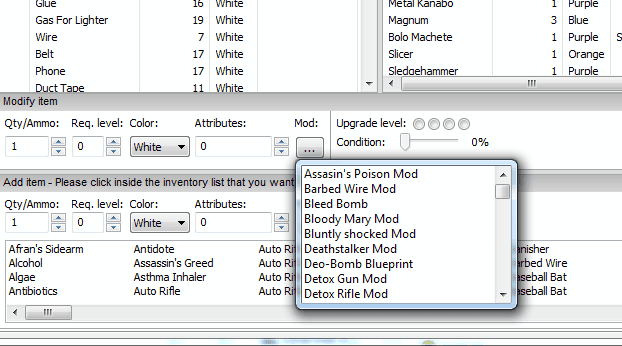
- Assign mod blueprints to items. I haven't made any restrictions, so you're free to test this with any item.
Screenshots
Download
dise_alpha_29.zip [link removed]